 Post Once
Bridges and more than one source account
A bridge is one source account plus the destinations and backups its posts go to. To repost from a second main account, add a second bridge from the bridge switcher. Free and Solo include 1 bridge, Studio 3 and Agency as many as you need.
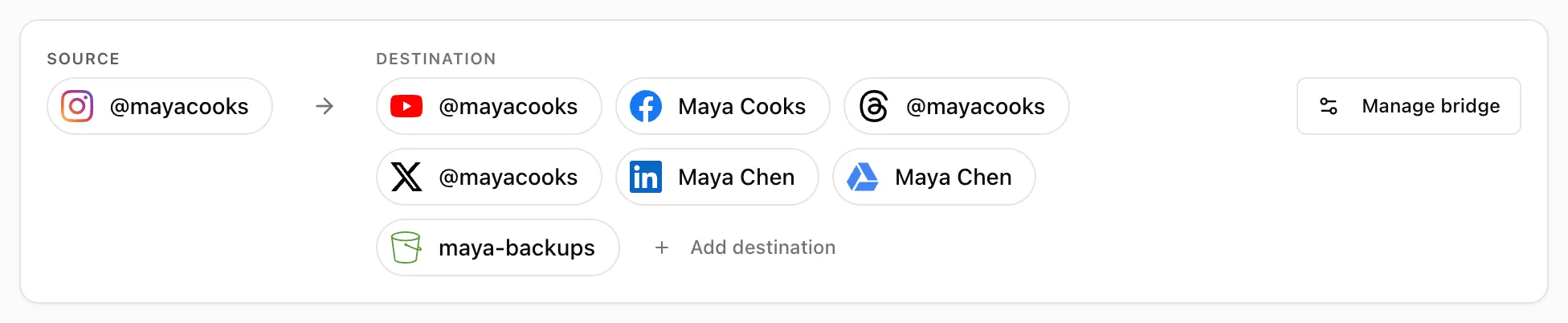
How bridges work
- One source per bridge. Each bridge reads new posts from one account.
- One account per platform. A bridge can repost to one YouTube channel, one Facebook Page, and so on.
- The source’s platform is left out. An Instagram bridge does not offer Instagram as a destination.
- One bridge per account. An account already in another bridge has to be moved with Move to in its three-dot menu.
Most people need one bridge. Agencies and people with several brands use one per brand.
Add a bridge
Open the bridge switcher at the top left of the app, next to the logo, and choose New bridge. Post Once walks you through picking its source and destinations, like it did when you signed up.
At your plan’s limit the option reads Upgrade to add more bridges and opens Billing.
| Plan | Bridges |
|---|---|
| Free | 1 |
| Solo | 1 |
| Studio | 3 |
| Agency | Unlimited |
Rename, pause or delete a bridge
Open Bridge in the top bar. The Bridge card at the top has:
- Name: press the pencil to rename it, up to 60 characters.
- Active: turn it off to pause the whole bridge. Post Once stops checking its source until you turn it back on.
- Delete bridge: available once every account in it is disconnected. You confirm by typing “delete”. Posts already reposted stay where they are, and you cannot undo it.
Frequently asked questions
Why does the website say source account and the app say bridge?
They count the same thing. Each bridge has exactly one source account, so a plan with 3 bridges can repost from 3 source accounts.
What happens to my bridges if I move to a smaller plan?
The bridges your new plan allows keep running, oldest first, and the rest are paused. Nothing is deleted. Pause one and resume another to choose which ones run.
Can one account be in two bridges?
No. An account can be in one bridge at a time. Use Move to in its three-dot menu to move it.