Post Once picks up each new post on Instagram, YouTube, Facebook, Threads or X within minutes and reposts it to your other accounts. OneUp checks for new posts once an hour. Plans start at $9 a month, against $25 for OneUp.
Posts to YouTube, Instagram, Facebook, Threads, X and LinkedIn
Reposts photos and carousels
Reposts Instagram and Facebook Stories
Backs up to Google Drive, Dropbox, Backblaze B2 and Amazon S3
Why people switch
Pay for the accounts you post on
Post Once charges for source accounts, the accounts you keep posting on. Solo is $9 a month for one, Studio is $19 for three, and Agency is $99 for as many as you run. Every plan reposts to as many accounts as you connect. OneUp counts cross-posting workflows, one per account you post from: one on Basic at $25 a month, three on Intermediate at $60 and five on Growth at $120, or $15, $48 and $84 a month billed yearly. Basic also stops at five social accounts, so a source with five destinations needs a sixth at $5 a month. See every plan and limit.
Reposts in minutes, not an hour later
Post Once checks Instagram and X for new posts every minute, and YouTube, Facebook and Threads every five minutes. Once a post is found and its upload finishes, it goes out to every account on your list with its caption. OneUp's cross-posting page says it checks your source accounts once an hour, and it only reads Facebook, Instagram and TikTok, so a YouTube video, a Threads post or an X post is never picked up. For anything timely, like a trend, a launch or news in your niche, an hour can decide whether you join the conversation or arrive after it. Here is how automatic cross posting works.
A backup in storage you own
Every post and Story can also be saved, with its caption, to your own Google Drive, Dropbox, Backblaze B2 or Amazon S3. OneUp connects to Google Drive and Dropbox so you can pull media into a post, but its docs don't describe saving your posts back out to storage you own. If an account is hacked, banned or deleted, that copy is the one you keep. You choose what each backup saves: photos, short videos, long videos or Stories. Read why a backup matters and which storage costs least.
A dashboard built only for reposting
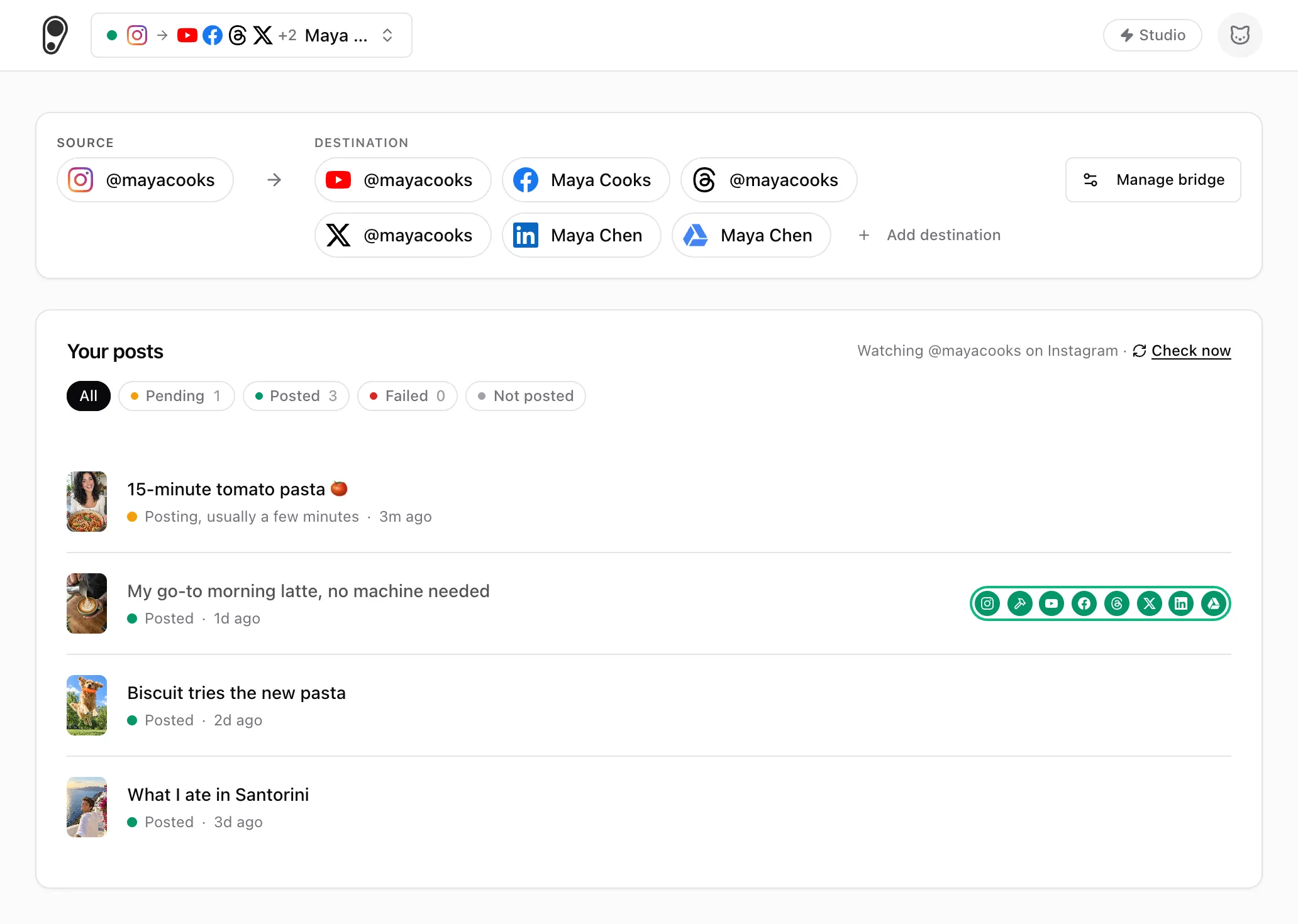
The dashboard shows your source account, the accounts it reposts to, and each new post with its status: pending, posted, failed or not posted. When an upload fails, Post Once tries again on its own, up to five times over about half an hour. If it still can't post, the reason shows in red, you get an email, and Retry sends it again to just the accounts it missed. There is no calendar, queue or composer to learn, because you never write, upload or schedule anything there. You keep posting in the app you already use.
See where every post goes
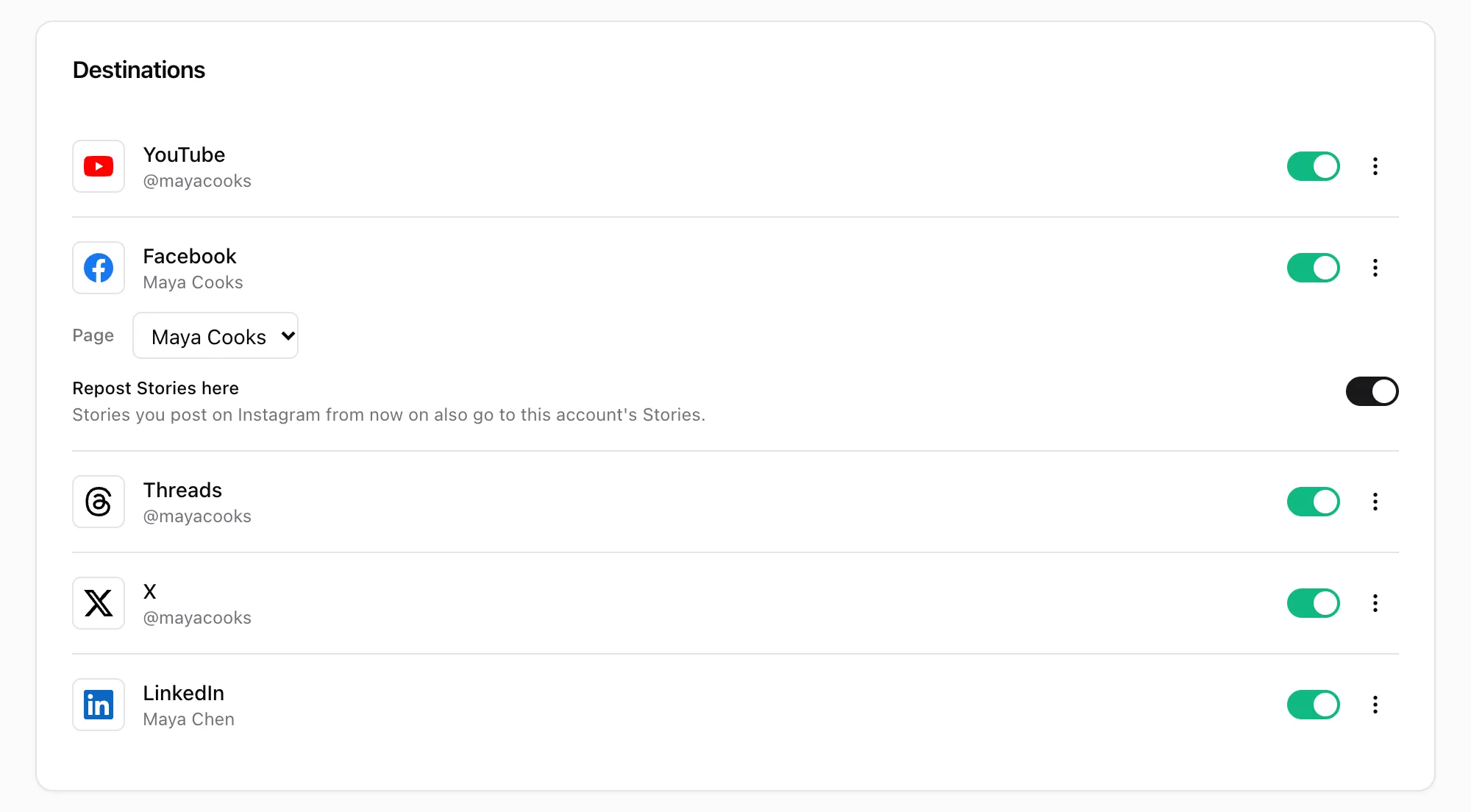
Screens from the Post Once app, shown with a demo account.
The dashboard: your source account, where it reposts and backs up, and each new post with its status. Point at a post to see every account it reached.The bridge page: switch a destination off without disconnecting it, pick the Facebook Page, and choose which accounts also get your Stories.
What a year costs
Slide to the number of brands you run. A brand is one account you post on, with its other accounts as destinations.
OneUp
$576
Intermediate, billed yearly
Post Once
$190
Studio, billed yearly
Post Once costs $386 less a year.
OneUp counts cross-posting workflows, one per account you post from, so here a brand is one workflow. Its plans also cap social accounts, five on Basic, and extra ones cost $1 to $5 a month, so its real total can be higher. Post Once's Free plan is left out because its 10 reposts do not renew.
Which one fits you
Pick Post Once if
You post on Instagram, YouTube, Facebook, Threads or X and want each post on your other accounts too.
You want reposts picked up within minutes, not once an hour.
You want to pay $9 a month for one source account, or $19 for three.
You repost to more than 10 accounts, or want a copy of every post in your own storage.
Pick OneUp if
Your posts start on TikTok. Post Once can't pick up TikToks yet.
Switching takes minutes
1
Sign up free and connect the account you post on. No card needed.
2
Add the accounts your OneUp workflow posts to, and a backup if you want one.
3
When your next post has been reposted everywhere, turn off the matching OneUp cross-posting workflow so nothing goes out twice.
Common questions
How Post Once compares with OneUp. Anything else, write to [email protected].
Is Post Once cheaper than OneUp?
Yes, at every size OneUp lists. Yearly prices: 1 brand: $90 on Post Once Solo, $180 on OneUp Basic. 3 brands: $190 on Post Once Studio, $576 on OneUp Intermediate. 5 brands: $990 on Post Once Agency, $1,008 on OneUp Growth. 8 brands: $990 on Post Once Agency, $2,880 on OneUp Business. Here a brand is one OneUp cross-posting workflow. Its plans also cap social accounts, and extra ones cost $1 to $5 a month each.
How much does OneUp cost?
OneUp's pricing page lists Basic at $25 a month or $180 a year, Intermediate at $60 a month or $576 a year, Growth at $120 a month or $1,008 a year, and Business at $300 a month or $2,880 a year. They include 1, 3, 5 and 8 cross-posting workflows and 5, 15, 30 and 80 social accounts. Enterprise starts at $2,000 a month. Post Once costs $9, $19 or $99 a month. See Post Once pricing.
How fast does Post Once repost?
Post Once, which reposts to all your other accounts automatically, checks Instagram and X for new posts every minute, and YouTube, Facebook and Threads every five minutes, then reposts as soon as each upload finishes. OneUp's cross-posting checks for new posts once an hour.
Is there a free OneUp alternative?
Post Once has a Free plan with 10 reposts and 10 backups, no card needed and no watermark. The reposts have no time limit, so you can watch it work on your own posts before you pay. OneUp has no free plan: every plan starts with a 7-day trial, then costs from $25 a month.
Can Post Once pick up posts from YouTube, Threads or X?
Yes. Connect any of them as your source account and each new post is reposted to your other accounts. OneUp's cross-posting reads from Facebook, Instagram and TikTok only.
Can Post Once repost my TikToks?
Not yet. Post Once picks up posts from Instagram, YouTube, Facebook, Threads and X. If your posts start on TikTok, OneUp can read them and Post Once can't.
How many accounts can one source repost to?
As many as you connect, on every plan. OneUp cross-posts each source account to up to 10 accounts and asks you to contact it for more.
Does Post Once back up my posts?
Yes. Each post and Story can be saved with its caption to Google Drive, Dropbox, Backblaze B2 or Amazon S3. OneUp imports media from Google Drive and Dropbox, but its docs don't describe backing your posts up. See which storage costs least.
What is the best OneUp alternative?
It depends on where you post. If your posts start on Instagram, YouTube, Facebook, Threads or X and you want them on your other accounts within minutes, with a copy in your own storage, Post Once does exactly that from $9 a month. If they start on TikTok, OneUp can read them and Post Once cannot yet. Comparing more tools? Read our Repurpose.io alternative page too.
Can I get my money back if it is not for me?
Yes. Your first payment on a paid plan has a 30-day money-back guarantee. OneUp refunds you if you cancel within a week of its free trial ending.
Can I run both while I switch?
Yes. Once Post Once has reposted your next post, turn off the matching OneUp cross-posting workflow, or that post goes out twice.
Try it on your next post.
Keep posting as usual. Post Once reposts it everywhere else and backs it up.
 Post Once